
Biometric Login Setup Guide for Kingia
What is Biometric Login and Why Use It?
Biometric login uses your unique physical characteristics, like your fingerprint or face, to verify your identity and grant access to your account. For players at Kingia casino, this technology offers a significant security upgrade over traditional passwords, which can be forgotten, stolen, or phished. Enabling this feature means you can log into your account instantly and securely with just a touch or a glance, eliminating the hassle of typing complex passwords. It also adds a powerful layer of protection, as your biometric data is stored locally on your device and not on any server, making it extremely difficult for unauthorized users to access your account and any Kingia bonus funds you may have.
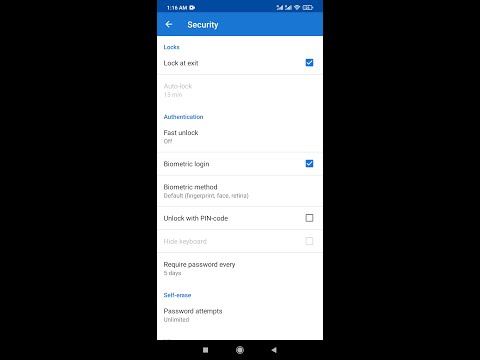
Step-by-Step Guide to Enabling Biometric Authentication
Setting up biometric access for your Kingia account is a straightforward process that typically takes less than five minutes. Follow these steps to activate it:
- Log into your Kingia account on your mobile device using your existing username and password.
- Navigate to your account settings or security settings menu.
- Locate the option labeled «Biometric Login,» «Fingerprint Login,» or «Face ID.»
- Toggle the switch to enable the feature.
- Your device will prompt you to authenticate using your already-configured fingerprint or facial recognition. Confirm the action.
- You should see a success message. Log out and attempt to log back in to test the new feature.
Once activated, every subsequent login will require your biometric input, seamlessly connecting you to the games and promotions at Kingia.
Compatible Devices and Requirements
Not all devices can support this advanced login method. To use biometric authentication with Kingia, you will need:
- A smartphone or tablet with a dedicated fingerprint sensor (e.g., Touch ID on iPhone) or a facial recognition system (e.g., Face ID on newer iPhones, or a supported Android device).
- The latest version of your device’s operating system (iOS or Android).
- The most recent version of the Kingia casino app installed on your device, available from the official App Store or Google Play Store.
- Biometric data (your fingerprint or facial scan) already set up and registered in your device’s security settings.
Troubleshooting Common Biometric Login Issues
Even the best technology can occasionally hiccup. Here are solutions to common problems players might face:
| Issue | Possible Cause | Solution |
|---|---|---|
| Biometric option not showing | App requires an update; device not compatible. | Update the Kingia app and your device’s OS. Check device compatibility. |
| Login fails repeatedly | Dirty or wet sensor; minor changes in appearance. | Clean the sensor. Re-scan your fingerprint or face in your device settings. |
| App asks for password anyway | Security feature after restarting device. | This is normal. Enter your password once after a device reboot. |
| Feature was working but stopped | App permissions may have been revoked. | Go to your device’s app settings for Kingia and ensure permission for biometrics is enabled. |
Security and Privacy Considerations
Understanding how your data is handled is crucial. Kingia does not have access to or store your actual fingerprint or facial geometry data. This sensitive information is encrypted and stored securely in a isolated part of your device’s hardware (e.g., the Secure Enclave on iPhones). The Kingia app merely receives a confirmation «yes» or «no» from the device’s operating system on whether the authentication was successful. This means your biometric data never leaves your device, ensuring your privacy is maintained. It is the most secure way to protect your account, your deposits, and your potential winnings from a Kingia no deposit offer or otherwise.
Maximizing Your Account Security
While biometric login is a powerful tool, it should be part of a broader security strategy. Always ensure you have a strong, unique password for your account as a backup. Be wary of phishing attempts that ask for your login details, even if they appear to come from Kingia. Official support will never ask for your password. Furthermore, keep your device’s operating system and the Kingia app updated to the latest versions to patch any potential security vulnerabilities. For those looking to claim a specific promotion, always enter the correct Kingia promo code during the deposit process to ensure your bonus is credited correctly. Combining biometrics with general security awareness creates a robust defense for your online gaming experience, allowing you to enjoy your Kingia free spins with complete peace of mind. For any further assistance, you can always contact the support team at Kingia.